

Five Scenarios Where Groovy Outperforms Graphical Message Mapping in SAP CPI
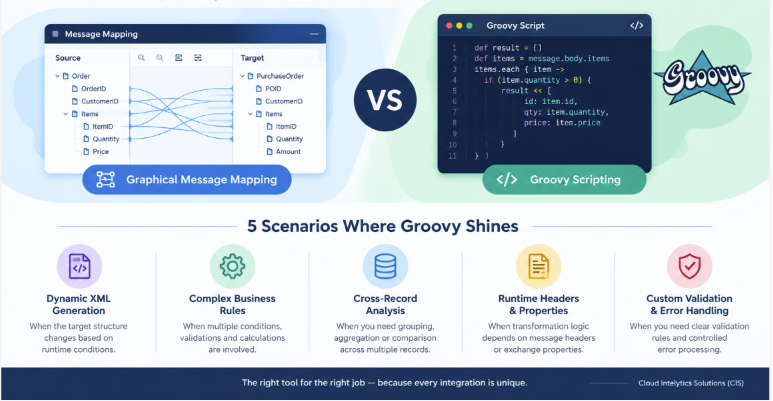
In SAP Cloud Integration, now part of SAP Integration Suite, transforming data between source and target systems is a fundamental integration requirement. Developers commonly use graphical Message Mapping, Groovy scripts or XSLT to perform these transformations.
Graphical Message Mapping is often the best starting point because it makes source-to-target relationships visible, supports standard mapping functions and helps other developers understand the transformation without reading code. However, some integration scenarios involve dynamic structures, complex business rules or runtime-dependent processing that can make a graphical mapping difficult to maintain.
This is where Groovy scripting can provide a practical alternative.
The objective is not to replace Message Mapping with Groovy everywhere. Instead, it is to recognise when scripting offers a clearer, more maintainable solution.
SAP's own scripting guidelines recommend using standard integration-flow capabilities wherever possible and avoiding custom scripts when an existing standard step can perform the required operation. SAP documentation: General Scripting Guidelines.
Let's explore five real-world scenarios where Groovy may be the better choice.
1. When the Target XML Structure Must Be Generated Dynamically
The challenge
Graphical Message Mapping works well when the target structure is known and defined through an XSD or another supported message definition. But what happens when the output structure depends on runtime business conditions?
Consider a warehouse integration between SAP Extended Warehouse Management (EWM) and a Warehouse Control System (WCS).
The source message may contain different reason codes:
-
Overheight
-
Overweight
-
Found
-
Missing
-
NoSuitableStorage
The target system might require different XML elements or attributes depending on the reason code. Some reasons may require an additional status field, while others may require a specific code or a different element structure.
When the target structure becomes highly conditional or dynamically generated, maintaining numerous mapping branches can become difficult.
Why Groovy can be better
Groovy allows developers to apply conditional logic and construct XML elements programmatically. This can be useful when the output structure varies significantly according to runtime conditions.
For example, the conceptual logic might be:
switch (reasonCode) {
case 'Overheight':
targetCode = 'ZOVH'
break
case 'Overweight':
targetCode = 'ZOVW'
break
default:
targetCode = ' '
}
This example illustrates conditional value assignment rather than a complete XML transformation.
For straightforward code conversions, graphical Message Mapping with a value mapping or conditional function may be simpler. Groovy becomes more attractive when the conditions control the structure of the output itself.
Best practice: Use Groovy when dynamic structure generation is genuinely complex. Prefer standard mapping functions or Value Mapping for simple, maintainable code conversions.
2. When Business Rules Require Complex Conditional Processing
The challenge
Not every transformation is a simple field-to-field mapping. Enterprise integrations often involve combinations of conditions, cross-field dependencies, validations and calculations.
For example, a purchase order might be accepted only when:
-
The supplier is active.
-
The purchase order contains at least one valid item.
-
The total quantity is greater than zero.
-
The currency and delivery information meet business rules.
-
Mandatory fields are present when a particular order type is used.
A graphical mapping can handle many conditional expressions, but complicated rules spread across multiple functions and mapping connections can become difficult to understand and test.
Why Groovy can be better
Groovy allows related conditions to be grouped into a coherent sequence of business-rule checks.
Illustrative logic:
if (!supplierId) {
// Handle missing supplier
} else if (!items || items.isEmpty()) {
// Handle missing order items
} else if (totalQuantity <= 0) {
// Handle invalid quantity }
This is illustrative logic, not a complete SAP CPI script.
The advantage is that a developer can read the validation sequence in business terms, add comments and test individual conditions.
However, do not move every business rule into Groovy merely because scripting is possible. Standard mapping functions, Router steps and Content Modifiers may be more appropriate for simpler conditions.
Best practice: Use Groovy when several interdependent rules form a coherent processing algorithm. Keep simple field-level conditions in graphical mapping wherever practical.
3. When the Transformation Requires Advanced Aggregation or Cross-Record Analysis
The challenge
Suppose an integration receives a message containing hundreds of warehouse handling units, order items or delivery records.
The target system requires the integration to:
-
Group records by warehouse or order number.
-
Compare values across multiple records.
-
Calculate totals or identify duplicate business keys.
-
Apply a rule based on the combined results.
-
Generate a consolidated output.
These requirements go beyond ordinary independent field mappings.
Graphical Message Mapping provides functions for many standard transformation patterns. Nevertheless, complex multi-record algorithms can become cumbersome when the logic depends on relationships across multiple repeating structures.
Why Groovy can be better
Groovy provides collection-processing capabilities that make grouping, filtering, comparison and aggregation straightforward to express.
For example, the conceptual operation could be:
def groupedItems = items.groupBy { item ->
item.warehouseCode
}
The result groups items according to warehouse code. Additional logic can then calculate totals or validate each group before producing the target message.
This approach is useful when the transformation is fundamentally an algorithm operating across collections rather than a simple mapping of individual fields.
Important distinction: For message splitting, standard Splitter steps, Aggregator patterns or other built-in integration-flow capabilities may be preferable. SAP specifically advises against replacing standard integration-flow steps with scripts unnecessarily.
Best practice: Use Groovy for complex cross-record processing when standard mapping functions and integration-flow steps do not provide a sufficiently clear solution.
4. When Transformation Logic Depends on Runtime Headers or Exchange Properties
The challenge
In many integrations, the message body alone does not contain all the information needed to produce the target payload.
An integration may need to use runtime information such as:
-
A source-system identifier.
-
A previously calculated routing property.
-
A business-unit identifier.
-
A runtime processing mode.
-
A value retrieved from an earlier integration-flow step.
For example, two source systems may send the same business object, but the target requires different output values depending on the originating system.
Why Groovy can be better
A Groovy script step can access the message and its headers or exchange properties through supported SAP APIs. This allows developers to combine the message content with runtime context.
The decision could follow this conceptual pattern:
if (sourceSystem == 'SYSTEM_A') {
// Apply System A processing
} else if (sourceSystem == 'SYSTEM_B') {
// Apply System B processing
}
This is illustrative logic; the variables must be populated from the relevant message or integration-flow context.
There is an important nuance: Groovy is not always necessary just because a mapping needs a header or property. SAP supports custom functions in Message Mapping that can access headers and exchange properties through the mapping context.
Refer to SAP's guide to accessing headers and properties in Message Mapping.
Best practice: Use a Content Modifier for simple header or property operations. Use mapping functions when the runtime value is needed within an otherwise straightforward mapping. Use a separate Groovy step when runtime context drives more extensive processing logic.
5. When Custom Validation and Error Handling Must Be Explicit
The challenge
An integration should not simply transform and forward every incoming message. It may need to detect invalid data before the message reaches the target system.
For example, an inbound delivery message might contain:
-
A missing delivery number.
-
An invalid warehouse identifier.
-
An unsupported reason code.
-
Conflicting item quantities.
-
A combination of fields that violates a business rule.
If these checks are scattered across numerous mapping expressions, it may become difficult for support teams to determine why a message failed.
Why Groovy can be better
A dedicated Groovy validation step can centralise related checks and provide a controlled validation result.
A suitable design can distinguish between:
-
Valid messages: Continue to the transformation and receiver.
-
Business validation failures: Produce a clear error classification and route the message according to the agreed process.
-
Technical failures: Allow the integration's exception-handling design to manage unexpected processing errors.
For example, a validation result could contain an error code and a concise explanation, such as MISSING_DELIVERY_NUMBER.
This can make testing, monitoring and support easier, provided the validation logic is documented and the error-handling design is consistent.
However, a Groovy script should not indiscriminately catch exceptions and continue processing. Doing so can hide failures and potentially send invalid messages to downstream systems.
Best practice: Keep validation separate from transformation where it improves clarity. Use the integration flow's exception-handling mechanisms and avoid exposing sensitive payload data in logs.
Groovy vs. Graphical Message Mapping: Quick Decision Guide
| Requirement | Recommended starting point |
|---|---|
| Straightforward source-to-target field mapping | Graphical Message Mapping |
| Standard concatenation, conversion or conditional mapping | Graphical Message Mapping |
| Simple code conversion using maintained lookup values | Value Mapping or graphical mapping |
| Complex dynamic XML construction | Groovy, where standard mapping is cumbersome |
| Interdependent business-rule processing | Groovy, where it improves readability |
| Complex cross-record calculations | Groovy or suitable standard integration-flow steps |
| Simple header or property assignment | Content Modifier |
| Runtime context inside an ordinary field mapping | Mapping function or Groovy, depending on complexity |
| Template-driven XML transformation | Consider XSLT |
| Message splitting or standard encoding operations | Appropriate standard integration-flow step |
The final choice should be based on the actual transformation requirements, not personal preference for graphical tools or code.
Five Best Practices for Production-Ready Groovy in SAP Integration Suite
Choosing Groovy is only part of the design decision. The implementation must also be reliable and maintainable.
1. Use supported APIs and libraries. Avoid internal runtime classes and unsupported dependencies that may become incompatible with platform upgrades.
2. Design for upgrade readiness. SAP's scripting guidance includes version 2.0 and upgrade-readiness recommendations. As of 2026, developers should review the current script-version guidance and compatibility checks for their tenant before creating or upgrading scripts.
3. Avoid unnecessary payload parsing. Do not repeatedly parse and serialise XML or JSON when a standard mapping, XPath expression or other supported step can achieve the same result more simply.
4. Keep scripts focused and testable. Use meaningful names, explanatory comments and reusable script collections where appropriate. Test empty values, missing fields, invalid inputs and large payloads.
5. Protect data and monitor responsibly. Avoid logging credentials or sensitive business data. Use appropriate logging controls and ensure exceptions provide enough diagnostic information without disclosing confidential information.
For further guidance, consult SAP's Use Scripting Appropriately and General Scripting Guidelines.
Final Thoughts
Groovy is a powerful extension to graphical Message Mapping in SAP Integration Suite, but it should be used selectively.
It can be the better choice when dynamic XML construction, complex interdependent business rules, cross-record calculations, runtime-dependent processing or explicit custom validation makes graphical mapping difficult to maintain.
For conventional field mapping and standard transformations, graphical Message Mapping often remains the clearest option. XSLT and standard integration-flow steps should also be considered when they fit the problem better.
The guiding principle is simple: start with standard capabilities, use graphical mapping where it remains clear, and introduce Groovy when it provides a genuine improvement in clarity, flexibility or maintainability.
At Cloud Intelytics Solutions (CIS), we believe that well-designed integrations are not defined by how much code they contain, but by how reliably they meet business requirements and how easily they can be maintained over time.
Need help with your SAP integration landscape?
Cloud Intelytics Solutions provides SAP integration consulting, architecture, development and technical support services. Contact us to discuss your integration requirements and explore opportunities to improve reliability, maintainability and operational efficiency.
Cloud Intelytics Solutions (CIS)
Seamless Integration, Effective Insights
Website: https://cloud-intelytics.com
Email: connect@cloud-intelytics.com
Comments
Add comment